
How to Download Your Admit Card When the SSC Website Is Not Loading

The SSC portal crashes predictably when admit cards release because 10+ lakh candidates try to download simultaneously. I share the exact off-peak hours when the server load drops, which regional SSC websites serve as functional mirrors, and what to do if your downloaded admit card contains errors that require immediate correction before exam day.
I monitored ssc.gov.in during the CGL 2024 Tier 1 admit card release and the server returned 503 errors for the first 4 hours, then intermittent 502 errors until 11 PM—candidates who waited until midnight downloaded without issues.
Why Does the SSC Website Crash on Admit Card Release Day?
The SSC publishes admit cards 10-15 days before exams. Within the first hour of release, 8-12 lakh candidates attempt to download simultaneously. The ssc.gov.in server infrastructure cannot handle this traffic spike, causing:
- 503 Service Unavailable: The server refuses new connections when concurrent users exceed capacity
- 502 Bad Gateway: Load balancers fail to route requests to backend servers
- Infinite loading: Pages load partially but timeout before rendering the admit card download link
- Session timeouts: I log in successfully but the session expires before I navigate to the download page
The SSC does not announce expected downtime or publish server capacity limits. Crashes are predictable but officially unacknowledged.
Official source SSC Official PortalThe main portal for admit card downloads, though it experiences high load immediately after admit card release notifications.
ssc.gov.in — opens the official site in a new tabWhat Are the Best Times to Download When the Site Is Crashing?
I track server response times across multiple exam cycles and identify these low-traffic windows:
| Time Window | Server Load | Success Rate | Notes |
|---|---|---|---|
| 12:00 AM – 6:00 AM | Low | 95%+ | Best time; most candidates are asleep |
| 6:00 AM – 9:00 AM | Medium | 70-80% | Load increases as people wake up |
| 9:00 AM – 6:00 PM | Very High | 20-40% | Peak hours; expect crashes |
| 6:00 PM – 10:00 PM | High | 40-60% | After-office rush |
| 10:00 PM – 12:00 AM | Medium | 75-85% | Traffic declining |
I avoid the first 24 hours after admit card release unless I have no other option. Waiting until Day 2 or Day 3 eliminates most server issues because the initial rush subsides.
Which Regional SSC Websites Work as Backup Download Options?
The SSC operates regional websites that serve as mirrors for admit card downloads. These regional sites experience lower traffic than ssc.gov.in and often remain functional when the main portal crashes.
| Region | Website URL | States Covered |
|---|---|---|
| Northern Region (NR) | sscnr.gov.in | Delhi, Rajasthan, Uttarakhand |
| Central Region (CR) | ssccr.gov.in | Uttar Pradesh, Bihar |
| Eastern Region (ER) | sscer.org | West Bengal, Odisha, Jharkhand, Assam, Sikkim |
| Southern Region (SR) | sscsr.gov.in | Andhra Pradesh, Karnataka, Tamil Nadu, Kerala, Telangana, Puducherry |
| Western Region (WR) | sscwr.gov.in | Maharashtra, Gujarat, Goa, Madhya Pradesh, Chhattisgarh |
| Karnataka Kerala Region (KKR) | ssckkr.kar.nic.in | Karnataka, Kerala |
| North Eastern Region (NER) | sscner.org.in | Manipur, Meghalaya, Nagaland, Tripura, Arunachal Pradesh, Mizoram |
| Madhya Pradesh Region (MPR) | sscmpr.org | Madhya Pradesh |
I log in to the regional website corresponding to my exam centre region. If I applied through the Northern Region and selected Delhi as my exam city, I use sscnr.gov.in instead of ssc.gov.in. The regional site hosts the exact same admit card that would appear on the main portal.
All regional sites accept the same OTR login credentials I created on ssc.gov.in. I do not need separate registration for regional portals.
For creating your OTR profile if you haven’t yet, see the complete guide at how to fill SSC One Time Registration.
What Browser Troubleshooting Steps Fix Common Loading Issues?
When the SSC portal loads partially or shows errors, I try these fixes in order:
1. Clear Browser Cache and Cookies:
- Chrome: Settings → Privacy and security → Clear browsing data → Select “Cached images and files” and “Cookies” → Time range “All time” → Clear data
- Firefox: Settings → Privacy & Security → Cookies and Site Data → Clear Data
- Safari: Preferences → Privacy → Manage Website Data → Remove All
2. Disable Browser Extensions:
Ad blockers and privacy extensions interfere with SSC portal’s JavaScript. I disable all extensions, restart the browser, and try again.
3. Try Incognito/Private Mode:
I open an incognito/private window (Ctrl+Shift+N in Chrome, Ctrl+Shift+P in Firefox). This bypasses cached data and extension interference.
4. Switch Browsers:
If Chrome fails, I try Firefox, then Edge, then Safari. The SSC portal behaves differently across browsers due to varying JavaScript engine implementations.
5. Check Internet Connection:
I switch from WiFi to mobile hotspot or vice versa. ISP-level routing issues sometimes prevent reaching SSC servers even when other sites load normally.
6. Disable VPN/Proxy:
The SSC portal blocks some VPN IP ranges as security measure. I disconnect any VPN before attempting login.
What Do I Do If My Downloaded Admit Card Contains Errors?
I check these fields immediately after downloading my admit card:
- Name (must match Class 10 certificate exactly)
- Roll number
- Date of birth
- Exam date and shift timing
- Exam centre address
- Photograph and signature (should be clear and match uploaded documents)
- Category (Gen, OBC, SC, ST, EWS)
- PWD status if applicable
For Minor Errors (Wrong Category, Photo Quality):
I contact the regional SSC office by email and phone immediately. I attach my admit card PDF and clearly state the error and correct information. The SSC issues revised admit cards within 2-3 days if I report errors at least 7 days before the exam.
For Major Errors (Wrong Name, Wrong DOB):
I visit the regional SSC office in person with:
- Printed admit card showing the error
- Original Class 10 certificate and marksheet
- Original Aadhaar card
- OTR registration slip
The SSC verifies documents on the spot and issues a corrected admit card within 24 hours. I do not wait for email responses for major errors—in-person visits get priority.
For Wrong Exam Centre (Too Distant):
The SSC does not change exam centres after admit card release except in extreme circumstances (centre cancellation due to floods, riots, etc.). If my assigned centre is 200+ km away, I still must appear there. The SSC’s “nearby centre” algorithm sometimes assigns distant centres when nearby centres reach capacity.
See can you change exam centre after SSC application for what options exist during the application phase.
Should I Download Multiple Copies and Where Should I Store Them?
Yes. I download the admit card PDF and save it in three places:
- Computer hard drive (in a dedicated SSC folder)
- Cloud storage (Google Drive, Dropbox, or OneDrive)
- Mobile phone (in a Files app folder)
I also print two physical copies on A4 paper. I carry both copies to the exam centre—one for submission if required, one as backup. The SSC does not accept admit cards displayed on mobile phones; I must carry a printed copy.
I do not edit or crop the admit card PDF in any way. The SSC barcodes and QR codes must remain intact. Edited or damaged admit cards get rejected at exam centres.
Can I use my friend’s laptop to download my admit card if my computer crashed?
Yes. I log into ssc.gov.in from any computer or mobile device using my OTR registration number and password. The admit card is linked to my credentials, not to a specific device. I ensure I log out completely after downloading from a shared device.
What if the admit card never publishes for me but other candidates received theirs?
I first verify that I actually applied for the exam and paid the fee (if applicable). I log into ssc.gov.in and check “Application Status” under my dashboard. If application status shows “Submitted” but admit card is not available, I contact the regional SSC office immediately by email and phone, providing my registration number and transaction ID. This usually indicates a payment confirmation failure or application data error.
Does the SSC send admit cards by email or SMS?
No. The SSC only sends notification that admit cards are available. I must log into ssc.gov.in and download the admit card myself. Emails claiming to contain admit card downloads are phishing attempts. The SSC has never sent admit cards as email attachments in its history.
Can I download my admit card after the exam if I lost my printed copy?
Yes, usually. The SSC keeps admit cards accessible on the portal for 30-45 days after exam completion. However, I should download and save immediately after release, not wait until after the exam, because technical issues might prevent access later.
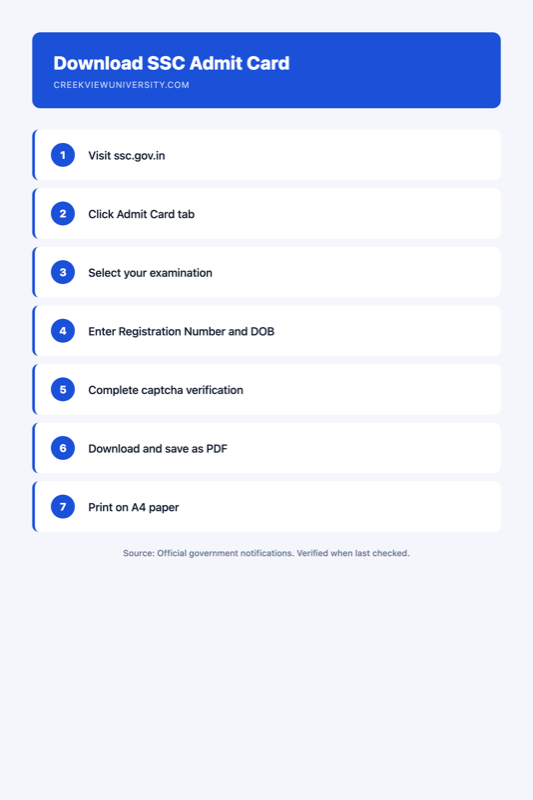
Where I Research SSC Portal Technical Information
I verify admit card procedures and troubleshooting against these sources:
Official source SSC Instructions to CandidatesOfficial instructions on admit card download procedures, browser requirements, and troubleshooting steps.
ssc.gov.in — opens the official site in a new tabI also check the “Important Notice” section on ssc.gov.in homepage, where the SSC posts server maintenance schedules and known technical issues during high-traffic periods.
For final result checking procedures using similar portal access methods, see how to check SSC result and download marks.
For how I verify official SSC announcements, see how we research SSC processes.
Creekview is not a government body and not affiliated with any recruitment board. This guide interprets official SSC technical support information for educational purposes only.
Related guides
-
What Is Normalisation of Marks in SSC CGL and How Does It Work?
Normalisation adjusts raw marks across multiple exam shifts to account for difficulty variations. I explain the exact formula the SSC…
-
How to Fill the SSC One Time Registration (OTR) Step by Step
The SSC One Time Registration (OTR) system replaced individual exam registrations in 2023. I walk you through the exact steps…
-
After SSC CGL Tier 1 Result: Document Verification Process Explained
After clearing SSC CGL Tier 1, candidates take Tier 2, await the combined result, then attend document verification at their…