
How to Check SSC Result and Download Marks Statement

SSC publishes results as PDF roll-number lists on ssc.gov.in, then releases individual scorecards with normalized marks 2-4 weeks later. You need your registration number and date of birth to download marks. Scorecards remain available for a limited window, typically 30 days, and cannot be retrieved after expiry.
The Staff Selection Commission declared 23 examination results in the 2024-25 cycle. Each result appears first as a PDF listing qualified roll numbers. Individual scorecards with normalized marks follow weeks later on the same portal. SSC processes over 3 crore applications per year across CGL, CHSL, MTS, CPO, and JE examinations. The Commission moved its entire digital infrastructure from ssc.nic.in to ssc.gov.in in 2023-24. That old domain no longer resolves.
I checked the current SSC portal on 29 August 2026. The result section, scorecard section, and candidate login all sit under ssc.gov.in. If you are trying to find your marks on the old ssc.nic.in address, stop. That server does not respond anymore.
Where does SSC publish results now?
SSC publishes all examination results exclusively on ssc.gov.in under the “Result” tab. The Commission stopped using ssc.nic.in as its primary domain after the portal migration in 2023-24. Results appear in two forms: first a PDF notification listing qualified candidates by roll number, then individual scorecards accessible through the candidate login portal. These are not released simultaneously.
Official source SSC Official PortalStaff Selection Commission, Government of India — primary website for all examination results and scorecards.
ssc.gov.in — opens the official site in a new tabHow do I check my SSC result using roll number?
The result PDF lists qualified roll numbers in ascending order. You do not need to log in. Download the PDF from the Results page and search for your roll number using Ctrl+F. If your number appears, you have qualified for the next stage.
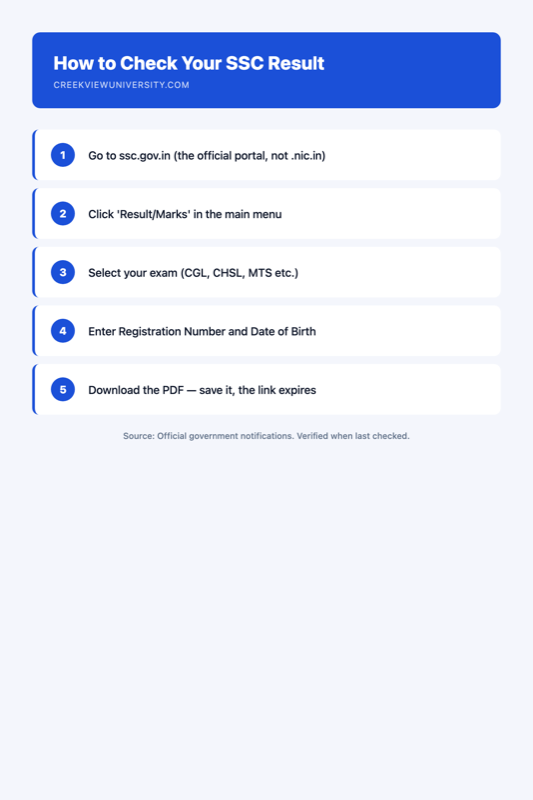
- Open ssc.gov.in in your browser.
- Click “Result” in the top navigation bar.
- Find your examination name (e.g., “CGL Tier-I 2025” or “CHSL Tier-I 2025”).
- Download the PDF file linked next to the result title.
- Open the PDF and press Ctrl+F (or Cmd+F on Mac).
- Type your 10-digit roll number exactly as printed on your admit card.
- If highlighted, you have qualified. If not found, you have not cleared the cut-off.
This PDF does not show your marks. It only confirms qualification status. For actual marks, you need the scorecard.
How do I download my SSC scorecard with marks?
The scorecard requires authentication. You log in with your registration number and date of birth. SSC does not use roll number for scorecard access — this confuses many candidates who try their roll number and get an error.
Go to ssc.gov.in, click “Score Card”, select the examination and year, enter your Registration Number (the number you received at application, not the roll number on the admit card), enter your date of birth in DD/MM/YYYY format, complete the captcha, and click Submit. Download or print the scorecard immediately.
The scorecard shows your raw marks, normalized marks, and marks obtained in each section. For multi-shift examinations, only the normalized marks determine your ranking. Save the scorecard as a PDF the moment it loads. SSC deactivates scorecard access after approximately 30 days.
What is the difference between the result PDF and the scorecard?
| Feature | Result PDF | Individual Scorecard |
|---|---|---|
| Content | Roll numbers of qualified candidates | Section-wise raw and normalized marks |
| Access method | Public download, no login required | Login with Registration Number + DOB |
| Release timing | On result declaration day | 2-4 weeks after result declaration |
| Availability window | Permanent (archived on portal) | Limited to approximately 30 days |
| Shows cut-off | Yes, in the notice preceding the PDF | No, only individual marks |
| Useful for | Quick pass/fail confirmation | Understanding performance, predicting next-stage chances |
When do scorecards become available after result declaration?
SSC does not release scorecards on the same day as results. Based on recent cycles, the gap ranges from 2 to 6 weeks. SSC issues a separate notice titled “Uploading of Score Card” when marks become available.
| Examination | Result Declaration | Scorecard Availability | Cut-off Range (General) |
|---|---|---|---|
| CGL Tier-I | 45-60 days after last exam | 2-4 weeks after result | 140-180 (normalized, out of 200) |
| CHSL Tier-I | 40-55 days after last exam | 2-3 weeks after result | 120-160 (normalized) |
| MTS | 50-70 days after last exam | 3-4 weeks after result | 100-140 (normalized) |
| CPO Tier-I | 40-60 days after last exam | 2-4 weeks after result | 130-165 (normalized) |
What are normalized marks and how does SSC calculate them?
SSC conducts multi-shift examinations because candidate volume exceeds single-sitting capacity. CGL Tier-I alone runs across 15-25 shifts. Different shifts get different question papers of varying difficulty. To ensure fairness, SSC normalizes marks using this formula:
Normalized Mark = Mean(overall) + [Individual Mark – Mean(shift)] x [SD(overall) / SD(shift)]
If your shift was harder (lower mean), your marks get adjusted upward. If easier, downward. Your scorecard displays both raw and normalized marks. The cut-off and ranking use only normalized marks. A candidate scoring 155 raw in a difficult shift may have normalized marks of 165, while a candidate scoring 160 raw in an easy shift may have normalized marks of 152.
Official source SSC Normalization MethodologyStaff Selection Commission published normalization formula for multi-shift computer-based examinations.
ssc.gov.in — opens the official site in a new tabWhat mistakes do candidates make when checking SSC results?
- Checking ssc.nic.in instead of ssc.gov.in. The old portal is offline. It does not redirect.
- Using roll number instead of registration number for scorecard login. The application form generates a registration number at submission. Scorecards require this number, not the admit card roll number.
- Not downloading the scorecard within the 30-day window. SSC deactivates scorecard access after approximately one month. There is no re-issue mechanism.
- Comparing raw marks across shifts. Raw marks are meaningless for ranking in multi-shift examinations.
- Ignoring the result notice. The notice contains cut-off marks, category-wise qualifying counts, and dates for the next stage.
My judgement: the moment SSC announces scorecard availability, log in that same day and save the PDF. If the portal is slow due to traffic, try between 11 PM and 6 AM. This is the single most important step candidates skip.
The crucial date rules determine your category for cut-off purposes. For fee exemption eligibility, see our dedicated guide.
Can I check my SSC result without registration number?
For the result PDF (pass/fail list), you only need your roll number to search the document. No login required. For the individual scorecard, you must have your registration number. If lost, SSC provides a “Forgot Registration Number” option that sends it to your registered email.
Why do my raw marks and normalized marks differ?
SSC normalizes marks because different shifts have different difficulty levels. The formula uses the mean and standard deviation of each shift relative to the overall examination. Differences of 5-15 marks between raw and normalized are common.
Is ssc.nic.in still working for results?
No. The ssc.nic.in domain is defunct as of 2024. SSC completed its migration to ssc.gov.in. The old domain does not redirect.
Sources
- Staff Selection Commission Official Portal — ssc.gov.in (accessed 29 August 2026)
- SSC Normalization Formula Notice — ssc.gov.in/portal/normalization
- SSC Annual Report 2024-25 — available on ssc.gov.in under “About Us”
- Department of Personnel and Training — dopt.gov.in
Creekview is not a government body and not affiliated with SSC. Read how we research government recruitment topics.
Related guides
-
After SSC CGL Tier 1 Result: Document Verification Process Explained
After clearing SSC CGL Tier 1, candidates take Tier 2, await the combined result, then attend document verification at their…
-
What the crucial date actually fixes, and what it does not
The crucial date is not a deadline for your paperwork. It is the day on which you must actually fall…
-
Who is exempt from the SSC application fee — and who is not
The SSC application fee is ₹100 and five groups do not pay it: women candidates, Scheduled Castes, Scheduled Tribes, Persons…